
GPT Image 2 skill for Claude Code: how to use it
The GPT Image 2 skill for Claude Code is the Actionway Skill: install it once and Claude Code can call GPT Image 2 at $0.15 per run, with Seedream and the Banana models listed beside it at their own prices. No OpenAI key to manage and no wrapper to write. The product photo in this guide — the white sneaker the rest of our demo series is built on — took 75 seconds from prompt to file.
Agent を接続するWhat GPT Image 2 is, in one paragraph
GPT Image 2 is OpenAI's image model for generating a picture from a description or editing an existing one with a reference. Claude Code cannot call it on its own. The Actionway Skill — a set of instructions Claude Code reads so it knows which services exist, what they cost, and how to run them — adds GPT Image 2 to the session along with the other image models, so you ask in plain words and get a file back.
| Model | Price | Good for | Takes a reference image |
|---|---|---|---|
| GPT Image 2 | $0.15 per run | generation and precise edit instructions | yes |
| Seedream 5 LTE | $0.10 per run | fast drafts | yes |
| Banana Pro | $0.30 per run | reference-based edits | yes |
| Banana 2 | $0.20 per run | generation and reference-based edits | yes |
A real run: the product photo
あなたの依頼
AGENT の返答
GPT Image 2 is in the catalog. Its price, with two neighbours for comparison:
あなたが選択: GPT Image 2
- Sends the request to GPT Image 2 — it starts as a background job
- Waits for it; this one finished in 75 seconds
- Saves the image into an outputs/ folder in your project (that is where every generated file lands) and hands you the file
結果
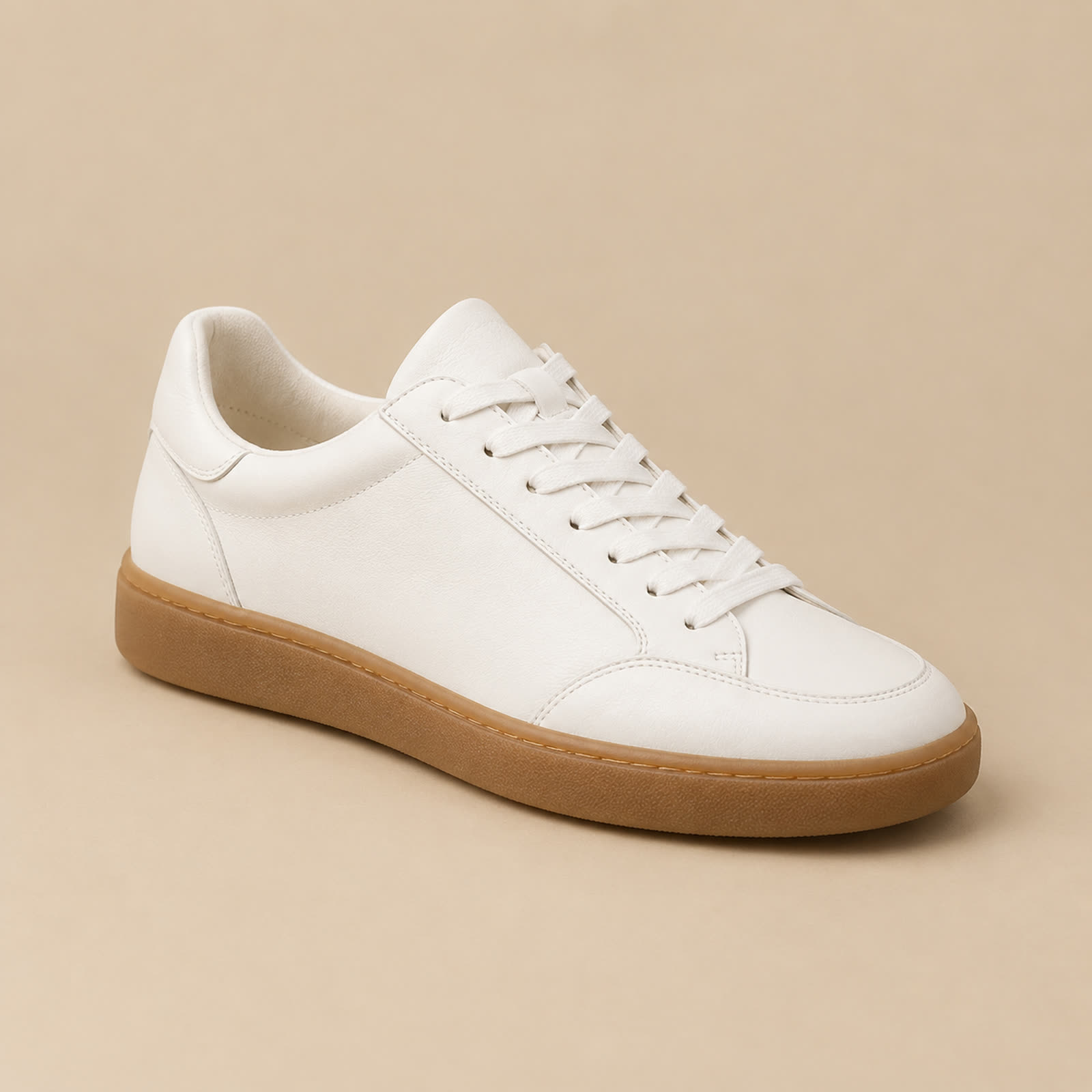
1 image · GPT Image 2 · $0.15 per run · charged from the wallet after completion
That is a real Claude Code session, unedited, with the model named up front. The agent still showed the neighbours and their prices — it always does — but because you named the model, the run went straight ahead. The photo did what a product shot has to do: one object, clean backdrop, no invented lettering, and enough detail in the leather and the sole to survive being edited later. That is why it became the reference for the three ad versions and the five-second product clip in this series. The GPT Image 2 model page is the reference for its price and inputs, and for where it sits in the image generation capability.
When to pick it
Pick GPT Image 2 when the brief has precise instructions — a specific angle, a clean backdrop, text placement, an edit you can describe in words — and when one strong final image matters more than the price of an attempt. Pick Seedream when you are still exploring and want cheap drafts, and the Banana models when the job starts from a reference photo. The agent lists all of them with prices and does not choose for you; say "you pick" and it takes the best-quality one.
Two things people expect to need and do not: an OpenAI API key — the run is billed to your Actionway wallet, so there is no key to create or leak into a repo — and a second install per model. One Skill covers the whole image row, so switching models is a word in your request. GPT Image 2 also edits from a reference image at the same price per image.
What to put in a product-photo brief
The prompt in the run above is a good template because every phrase does a job. "Single" and "one sneaker" stop the model from adding a pair or a second angle. "Seamless backdrop" and a named colour give you a background that is easy to cut out or replace later. "Soft studio light" avoids hard shadows that fight with whatever scene the ad ends up in. "Slight three-quarter angle" is the angle catalogues use because it shows the toe, the side, and the sole at once. And "no text" matters more than it looks: image models like to add lettering to shoes, boxes, and walls, and removing it afterwards costs another run.
Leave out what you do not need. Every extra adjective is one more thing the model may satisfy at the expense of the one you cared about, so a brief of one subject, one background, one light, and one angle usually beats a paragraph. If you want a second version, change one phrase at a time — the colour of the backdrop, the angle — so you can tell what each change did; at $0.15 per run, a set of four variations is still pocket change.
こう頼む
Same brief, but a matte black backdrop and the shoe seen from directly above.
A follow-up like this runs as a new GPT Image 2 job at the same price; the agent names the file after the change so the variations stay easy to tell apart in outputs/.
Set it up once
npm install --global @actionway/cli@latest
actionway init
mkdir -p "$HOME/.claude/skills"
cp -R "$HOME/.actionway/skill/actionway" "$HOME/.claude/skills/actionway"You need Node.js 20 or newer and an Actionway account; after sign-in the agent tells you your wallet balance and, if it is empty, links you straight to top-up. Prefer a plugin or a Remote MCP server to the command line? Both end at the same catalog and the same wallet — the get started page lists the steps per client side by side.
よくある質問
Is there a GPT Image 2 skill for Claude Code?Not a standalone one. The Actionway Skill includes GPT Image 2 alongside Seedream and the Banana models, with the price shown before every run — $0.15 per run for GPT Image 2.
How do I use gpt-image-2 in Claude Code?Install the Actionway CLI, run actionway init, then name the model in your request: "use GPT Image 2 for a product photo of …". The agent runs it, waits, and saves the image into your project's outputs/ folder. The sneaker photo above took 75 seconds.
What does GPT Image 2 cost per image?$0.15 per run in the Actionway catalog, for generation or a reference-based edit, billed to your wallet after the run completes. The GPT Image 2 model page shows the current price.